
The present chapter will introduce all the files in the projects folder. Currently four projects are available: Theoretical, NEMO, AVISO, IFS, ROMS.
The files located in the project's folder are expected to be modified by the user when creating thier onw project. The most extensive changes will be in the namelist file, where all the parameters for the project are set. Next in importance is the read_field.F90 file, which is responsible for setting up the frequency of data input into the model and input data processing, if necessary (read more here). Next, the grid_setup.F90 file might also be needed to modify, as the grid in different models tends to differ. You can read more about grid setup here. Finally, in very rare case you might need to change the Makefile.prj file, which is explained in this subsection.
The user is expected to make changes in the files located in the project's folder!
setup_grid.F90
This subroutine defines all the variables linked to the grid such as the horizontal resolution or the grid area. The following variables are initialised in this subroutine:
- dxdy [mandatory]: the area of horizontal cell-walls.
- dzt [mandatory]: size of the vertical wall (dz) computed in T points.
- dxv: size of the zonal wall (dx) computed at V points.
- dyu: size of the meridional wall (dy) computed at U points.
- kmt: number of vertical model levels from surface to bottom topography.
- dzu: size of the vertical wall (dz) computed at U points.
- dzv: size of the vertical wall (dz) computed at V points.
More information on the setup_grid.F90 can be found here
dzt is a mandatory variable that needs to be defined either in setup_grid.F90 or in read_field.F90.
read_field.F90
This subroutine reads velocities and optionally some tracers from netCDF files and computes the mass/volume fluxes for TRACMASS.
There are two kind of variables that are stored at different time steps: 2-step variables and 3-step variables:
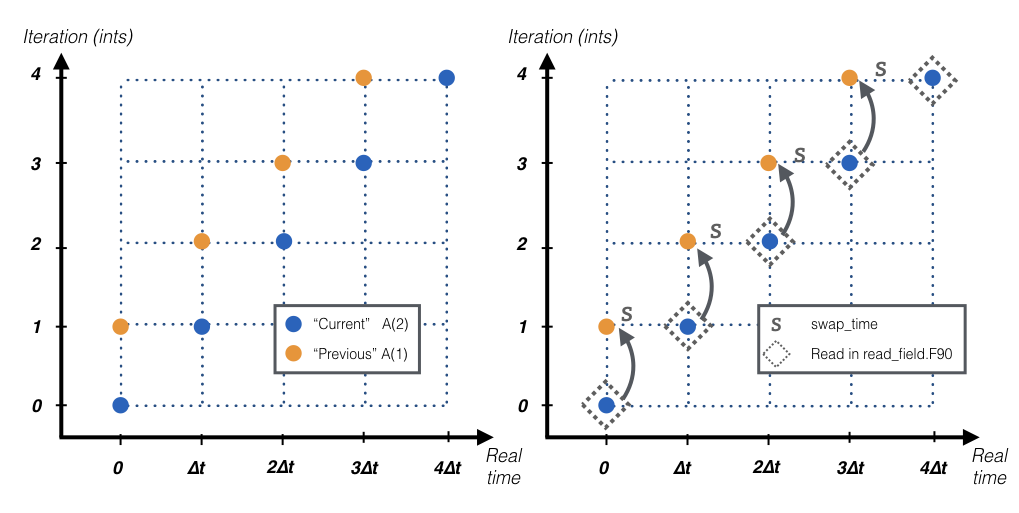
- The 2-step variables are those used to compute the time interpolation in between two time steps. These variables include all the mass/volume fluxes, tracer values, grid mass/volume tendecies, or scale factors. These variables have two time steps that represent: the “previous” time step (1) and the “current” time step (2). The data is read and stored in index 2, in the following time step the subroutine swap_time will reassign the former “current” time step into the new “previous” time step.
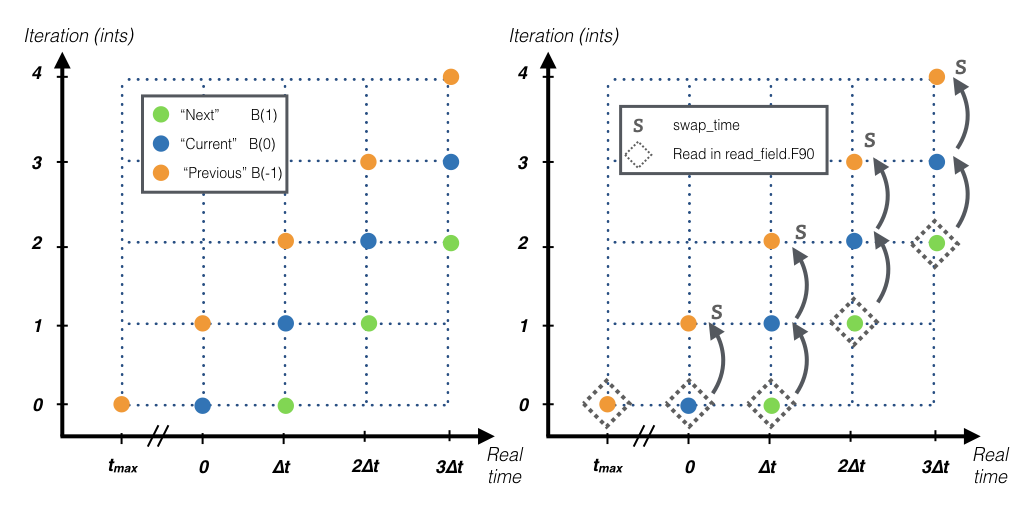
- The 3-step variables are those used to compute the mass/volume change dzdt. These variables include the size of the vertical grid dzt, surface boundary hs, or the tracer value tracertraj. These variables have three time steps that represent: the “previous” time step (-1), the “current” time step (0), and the “next” time step (1). The data is read and stored in index 1, in the following time step the subroutine swap_time will reassign the former “current” time step into the new “previous” time step, and the former “next” into the new “current” time step. In the first iteration of TRACMASS (ints=0) all three time steps are read.
The following variables are initialised in this subroutine:
- uflux [mandatory, 2-step variable]: zonal volume/mass flux.
- vflux [mandatory, 2-step variable]: meridional volume/mass flux.
- dzt [mandatory, see warning in setup_grid, 3-step variable]: size of the vertical wall computed at T points.
- dzdt [2-step variable]: time derivate of the vertical grid.
- tracers( : )%data [2-step variable] and tracertraj [3-step variable]: tracer values if l_tracers is TRUE.
kill_zones.F90
This subroutine defines the limits of the domain. If a trajectory is outside the domain the subroutine will identify it with a flag (nend). nend = 0 is reserved to the time exceeding case and nend = 1 is reserved to the trajectories reach the surface (z1 == km).
There are four types of killing zones defined by exitType :
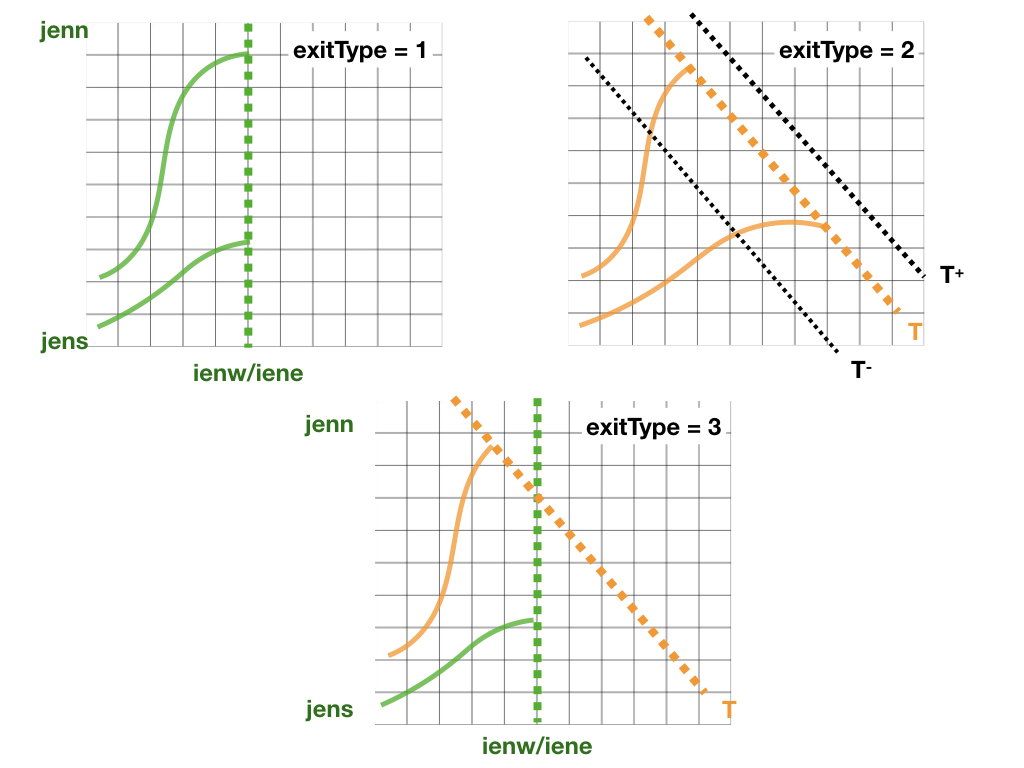
- exitType=1 : killing zone defined by a geographical domain given by [ iene, ienw ]x[ jens, jenn ]. If a trajectory is within those indexes it will be terminated. It is not possible to add height range to these kill zones, so the kill zone will be active in the whole model's depth.
- exitType=2 : killing zone defined by a tracer value tracere. If maxormin = 1 (-1) the isoline is the maximum (minimum) value of the tracer.
- exitType=3 : killing zone defined by both a geographical domain and tracer isolines.
- exitType=4 : the killing zone is hard coded by the user.
More detailed information about the kill zones can be found here.
Makefile.prj
This makefile sets the chosen pre-processing options. Before compiling the main program make sure to check the pre-processing options.
This is a list of the current pre-processing options:
| Compilation flag | |
|---|---|
| time_analytical | Turn on time analytical scheme (in development, not extensively tested) |
| w_2dim | Turn off vertical fluxes |
| w_3dim | Compute 3D vertical velocities |
| w_explicit | Read 3D vertical velocities from input files - not recomended |
| no_netcdf | Run TRACMASS without netcdf libraries |
| A_grid | Original dataset on a A grid |
It is recommended to let TRACMASS calculate the vertical velocity flux, but it is possible to also implicitly define the vertical flux with w_explicit.
time_analytical has not been explicitly tested and is still in development stage. Use it with caution.
When setting up the Makefile.prj, use an already existing file from one of the projects, that most closeley matches your model setup. When setting up a variable, for example, time_analytical option, before the variable add caputal letter D so that the Makefile in the root folder can process it properly:
fl02 = -Dtime_analyticalIf you wish to add another option that has not been already declared in the Makefile.prj, you need to define it as a new flag. For example, we want to explicitly provide the vertical velocity/flux data:
fl04 = -Dw_explicitAnd we need to add this new flag to be sent to the Makefile in the root directory of TRACMASS, so we add the new flag fl04 to the string ORM_FLAGS at the end of the file like this:
ORM_FLAGS= -D$(PROJECT) \
  $(fl01)$(fl02)$(fl04)
A typical file, where we allow movement between the vertical layers and allow TRACMASS to compute the vertical flux would look like the following code snippet:
# Makefile for my custom run
#========================================================================

# Vertical velocities
#------------------------------------------------------------------------
#fl01  = -Dw_2dim       # Turn off vertical velocities.
fl01  = -Dw_3dim       # Compute 3D vertical velocities.

#fl04 = -Dw_explicit   # Provide vertical velcotiy data

# Time integration scheme
#------------------------------------------------------------------------
#fl02 = -Dtime_analytical   # Analytically calculate trajectories


#========================================================================

ORM_FLAGS= -D$(PROJECT) \
$(fl01)$(fl02)$(fl04)
Notice that the options that I don't need in this run have been commented out with # symbol.
Namelist
Many variables at TRACMASS can be modified using the namelist without the need to recompile the program. Each project has a namelist_CASE.in in the project folder. When TRACMASS is compiled a copy of the namelist (namelist.in) can be found in the main TRACMASS directory.
The list of all the variables that can be changed in the namelist and their corresponding group can be found in the section Namelist.